


How forward-thinking enterprises are deploying Claude Teams with Entra SSO, Intune Compliance, and Conditional Access, and finally giving their teams an AI that delivers on its promise.
The Room Where It Happened
I was invited into an executive review board meeting about six weeks ago. The agenda item was AI Governance. I was not on the agenda. I was the consultant sitting at the side of the table, the kind of seat that feels comfortable until the conversation turns technical and two very senior people suddenly decide you are the most useful person in the room.
The CTO and CFO were mid-discussion. It was polite. The specific kind of polite that suggests both were making an effort to stay that way.
The CFO had a slide open showing two AI tool line items, Microsoft Copilot and Anthropic Claude, and was asking a perfectly reasonable question, the kind CFOs are paid to ask: if Copilot is our primary AI, why are we paying for Claude? And if Claude is doing the work, what is the plan when Copilot comes up for renewal?
The CTO was defending Copilot, not without reason. It was approved. It had passed the security review. It integrates natively with M365. On paper, it is exactly the kind of tool a CTO should be able to point to and say we made the right decision.
Then he turned to me and said something I have since heard in several other enterprises:
Copilot is critical to our IGA. License assignment works through access packages. It is part of our governance model.
I took a breath and responded, respectfully but directly: that is true. And the same applies to Claude.
Every SAML application registered in Entra ID can be governed through access packages in Entra Suite. Copilot is not unique in this regard. The capability belongs to Entra, not to Copilot. What a Microsoft sales rep demonstrated, Copilot license assignment through access package requests, is valid. It is also exactly what you can configure for Claude Teams as an Enterprise Application, with the same entitlement management, approval workflows, and lifecycle automation. The IGA story is an Entra story. Copilot simply happened to be present when it was explained. The room went quiet. Then the CFO asked me to walk through what the right architecture should look like.
Then someone at the far end of the table asked: what about ChatGPT for Business? What about Google NotebookLM? Where do those fit?
That question led to one of the most important parts of the discussion. I will come back to it. This article is the full walkthrough.
Why Copilot Silently Fails
Before we talk about what works, we need to be clear about what does not, and why.
The Copilot failure in most enterprises is not a security issue. It is not an adoption issue. It is an architectural limitation that exists before a single license is assigned.
Copilot’s intelligence is only as current as what SharePoint has indexed. That may sound minor. It is not. Every document not crawled, every file in a location the indexer has not reached, every piece of content behind a sensitivity label that creates a retrieval conflict does not exist to Copilot.
When Copilot returns an incorrect answer, a partial answer, or nothing at all, it does not explain why. It does not say it could not find the file. It either produces something or remains silent. Both outcomes are worse than a clear error.
There is also an indexing gap organisations consistently underestimate. Copilot enforces permissions correctly. It will not surface content a user is not authorised to see. But it will also not surface content that has not been indexed, content the crawler has not reached, content excluded by sensitivity label configuration, or content added after the last crawl.
This is not a permissions issue. It is a coverage issue, and sometimes a query interpretation issue where the wrong section is retrieved from the right document. From the user’s perspective, the result is the same: Copilot cannot find what they need. The cause determines the fix.
We saw this in a live environment. A SharePoint migration moved a large volume of files into a new library. The migration triggered tenant-level throttling. SharePoint went down temporarily. When it recovered, the files were there, but the index had not caught up. Copilot, working from a stale index, returned results that were weeks out of date. No one noticed immediately. There was no alert. No error. Just incorrect data presented with the same confidence as accurate data.
That is the core issue. Not that Copilot is ineffective, but that it was positioned as a universal knowledge layer while depending on a complete and current index that very few enterprises have on day one.
The index improves over time. The frustration arrives first. And first impressions in enterprise AI deployments are difficult to recover.
The OKR Reckoning: What AI Was Supposed To Deliver?
The most concrete way to see this gap is through OKRs that assumed AI would act as an accelerator. Across the personas below, the pattern is consistent. The OKR was set with Copilot as the enabling tool. The OKR was missed. The root cause was the same. Copilot could not reach the data required.
Engineering: Reduce PR Review Cycle from 5 Days to 2 Days
The goal was clear. Review cycles slow down when reviewers lack context.
Microsoft does offer Graph Connectors to bring systems like GitHub into the M365 index. This is real. But deploying and maintaining them requires setup, approvals, and ongoing management. In most enterprises, this takes months.
The work does not wait.
Product: Reduce Research-to-Spec Turnaround from Two Weeks to Three Days
Product managers operate across multiple tools. Research, design, and planning rarely sit within Microsoft 365. Without access to those systems, the first step of any spec cycle remains manual.
Finance Operations: Reduce Monthly Close Preparation from Four Days to One and a Half Days
Finance data lives across platforms. SAP, Concur, QuickBooks, and others each hold part of the picture. Without a way to unify this, the process stays fragmented.
Customer Success: Increase Account Review Preparation Speed by 60%
Customer context is spread across CRM, support tools, and communication platforms.
Without visibility into all of them, preparation remains manual. The pattern is structural. Copilot works well inside M365. Most work does not.
What "Actually Working AI" Looks Like Architecturally?
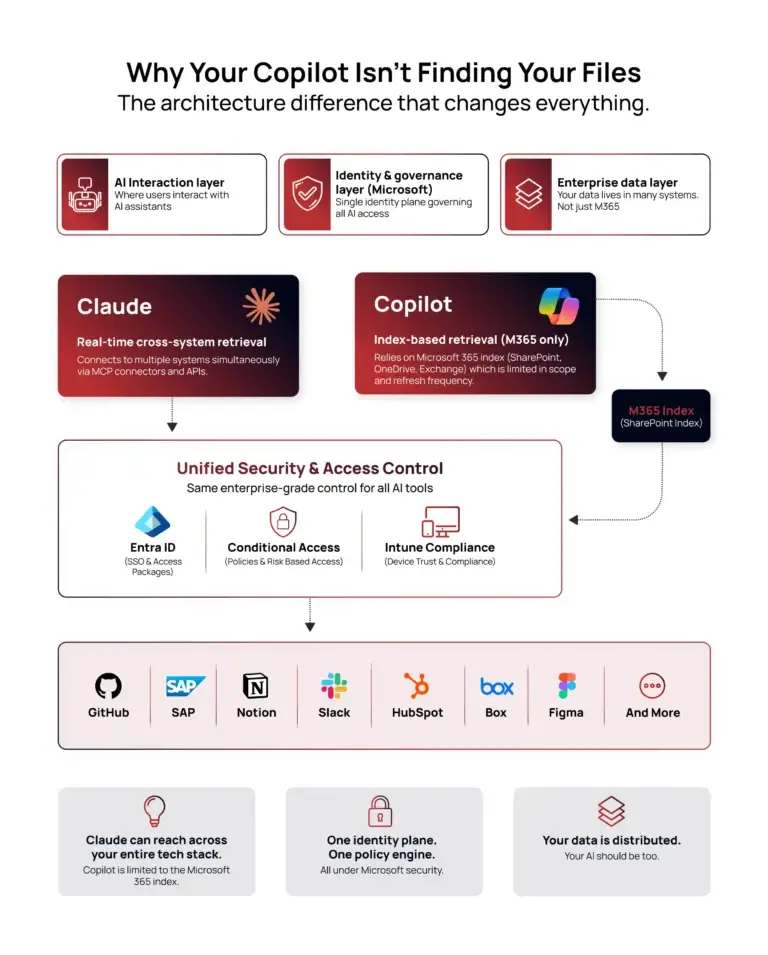
The difference comes down to how information is retrieved. Copilot uses an index-based approach. It queries a pre-built semantic index. The advantages are clear. It is fast, scalable, and centrally governed.
The limitations are equally clear. It only knows what has been indexed. It can return incomplete or outdated information. It does not extend naturally to external systems. Other approaches use live retrieval. They query systems directly at the time of request. This enables access to real-time data across platforms. There are trade-offs. API calls introduce latency. Reliability depends on external systems. But for cross-system work, this model aligns with how organisations actually operate.
The Security Architecture Your CISO Will Actually Approve
This architecture does not introduce new risk categories. It maps to controls already in place. Entra SSO provides identity. Conditional Access enforces MFA and device compliance.
Intune ensures only managed devices can access the system. User lifecycle is handled at the identity layer. Audit logs are already captured. This is not a new model. It extends the existing one.
The Economic Model: AI Spend a CFO Can Approve.
The economic failure of most enterprise AI deployments is not overspend. It is unpredictable spend, budgets held centrally by IT, limited cost center visibility, and little connection between AI investment and team-level outcomes. The model below addresses this directly.
Seat-based allocation by cost center. Claude Teams seats are allocated by team, Engineering, Product, Finance Operations, Customer Success. Each team owns its AI budget line. IT provisions and governs, but does not own the ROI. The team lead responsible for the OKR owns the seat budget. This is how every other SaaS tool in your estate is managed, and AI should be no different.
Persona-based daily overage caps. Not all AI work is equal. An engineer running Claude Code against a production codebase consumes far more than a finance analyst drafting monthly commentary. Overage policy should reflect this, not as a restriction, but using the same logic applied to travel policy, software spend limits, and cloud usage quotas.
|
Persona |
Tooling |
Daily Overage Cap |
|
Engineering |
Claude Teams + Claude Code + Cursor Pro |
$50/day |
|
Product |
Claude Teams |
$25/day |
|
Customer Success |
Claude Teams |
$15/day |
|
Finance Operations |
Claude Teams |
$10/day |
These caps are configurable in the Anthropic admin console. No custom tooling. No API integration. The CFO gets a predictable worst-case AI spend per team per month, and the budget uncertainty that slows down AI approvals is addressed upfront.
The board scenario framing. There are two paths available to any organisation currently running Copilot.
Scenario A is to stay the course. Copilot renewal proceeds. OKRs that assumed AI acceleration continue to miss. Engineering and product teams, who already use AI tools personally and understand what is possible, begin to disengage from official tooling. Shadow AI grows outside your governance boundary. The CISO who approved Copilot is still defending it eighteen months later to a CIO who has lost confidence.
Scenario B is to deploy Claude Teams alongside Copilot for the non-regulated workforce, governed through Entra and Intune, allocated by cost center, and capped by persona. The incremental cost per seat is modest. The OKRs that were missed begin to be met. The AI budget becomes defensible because it is tied to outcomes, not just licenses.
The difference between Scenario A and Scenario B is not cost. It is the cost of the OKRs you already committed to your board.
The Honest Conversation About Copilot
Microsoft Copilot is an expensive and capable executive assistant. That is not a criticism. Executive assistants are valuable. But there is a meaningful difference between an executive assistant and a knowledge worker accelerator, and most Copilot deployments have been sold as the latter while consistently delivering the former.
What Copilot genuinely does well is manage organisational overhead. It schedules triage calls when delivery slips, drafts escalation emails when deadlines are missed, and coordinates multi-team reviews that often pull several people into conversations longer than necessary. It is highly effective at keeping complexity moving.
What Claude does is eliminate the need for that complexity in the first place. The agent processes status updates before meetings are scheduled. The synthesis happens instantly, replacing hours of coordination. The triage session that once consumed a morning becomes a structured query against live project data, surfacing answers before calendars are even opened.
These are not competing tools solving the same problem. They are built for fundamentally different kinds of work. The issue is that most organisations deployed Copilot expecting it to function as a knowledge work accelerator. It cannot. Until that distinction is clearly stated in the boardroom, productivity outcomes will continue to underdeliver.
On Agent 365 and Entra, what does not change is equally important. This should not be misread. Microsoft’s agentic platform, Agent 365, Entra Agent ID, Federated Identity Credentials, Conditional Access, Defender, and Purview, remains the right foundation for identity, governance, and security. Microsoft delivers IAM at a level that is difficult to match. The architecture described here does not replace that, it reinforces it. Microsoft continues to operate as the identity and governance plane, while tools like Claude operate in the reasoning and knowledge work plane. These are distinct layers, and conflating them is where most of the confusion begins.
The Rudder Framework: What To Do When Someone Asks for ChatGPT or NotebookLM?
After walking through the Claude architecture in that boardroom, the question surfaced as expected: what about ChatGPT for Business, or Google NotebookLM? If the door is opened to non-Microsoft AI tools, where does it stop?
The answer is straightforward. It stops at your governance boundary. And that boundary already exists, it simply needs to be applied consistently.
The Rudder Framework is how Digital Proton approaches multi-AI governance in enterprise environments.
The analogy is deliberate. A rudder does not stop a ship; it steers it. Security plays the same role. It defines direction, sets boundaries, and determines which tools are allowed to operate within the environment and under what conditions. Leadership, particularly the CTO function, provides the acceleration once those boundaries are clear. Remove the rudder, and you create velocity without direction. Remove the wings, and you create governance without value.
At the centre of the Rudder Framework is a consistent evaluation model that applies to every AI tool request without bias. Whether the request is for ChatGPT, NotebookLM, or Claude, the same lens is applied. The tool must demonstrate a credible compliance posture, integrate cleanly into the identity layer through Entra, align with DLP enforcement through Defender and Purview, respect clear data boundaries, and serve a defined business purpose tied to specific roles and outcomes. The framework does not favour vendors. It enforces discipline and consistency.
The unsanctioned AI problem is not solved by restricting employees to a single approved tool. It is solved by creating a governance process that is fast, credible, and fair. When employees trust that requests will be evaluated on merit and turned around quickly, they stop routing around governance. When they assume the answer will always be no, they use personal tools anyway, and visibility is lost. MDCA and Purview enforce the boundary. AI Governance owns the intake. The Rudder Framework connects the two.
A Message to the CHRO: The Workforce Argument Nobody Is Making.
During the same set of executive conversations, a point emerged that reframes the entire discussion from a workforce perspective.
If the goal of enterprise AI is to improve productivity for existing employees rather than substitute for new hires, then restricting the organisation to a single AI tool becomes a strategic contradiction. No business function operates effectively with a single capability repeated at scale. Diverse teams outperform because different skills solve different problems. The same principle applies here.
A more balanced AI stack reflects a healthier, more capable workforce. Claude excels at knowledge retrieval and cross-system reasoning. ChatGPT may better support creative workflows that teams have already built around. NotebookLM is powerful for research-intensive roles that require deep engagement with large document sets. These are not competing tools—they are complementary capabilities operating within a shared governance boundary, visible to the same security team and auditable through the same systems.
The CHRO who hears “we restrict AI to one tool because it is simpler to govern” should ask a more direct question: simpler for whom? Simpler governance often translates into reduced capability for the people expected to deliver results. And the individuals most capable of doing exceptional work are often the first to find better tools, with or without approval.
Give them the tools. Govern the boundary. That is the model the Rudder Framework enables.
Stepping Outside Microsoft Is Not a Taboo
There is an assumption embedded in many enterprise AI conversations that needs to be challenged directly: that choosing a non-Microsoft AI tool is a departure from the Microsoft ecosystem or introduces unnecessary risk.
It is neither.
The principle is straightforward. As long as a platform can be onboarded into your Microsoft governance framework, through Entra SSO, Conditional Access, Intune compliance, and Defender monitoring, it belongs in your environment on the same basis as any other approved SaaS application. The governance layer remains Microsoft. The capability layer can come from anywhere.
This is not a new approach. It is how enterprise architecture has operated for years. Platforms like Salesforce, CrowdStrike, and Zscaler are all governed through Microsoft’s identity and security plane. Claude fits into that same model. The strongest technology environments are not built on single-vendor dependency, but on selecting the right tool for each function and governing them centrally.
When a CTO says “we should stay in the Microsoft ecosystem,” the correct interpretation is that Microsoft remains the governance backbone. Everything else operates within it.
Who Still Runs Copilot: The Regulated Worker Carve-Out.
Not every employee should move away from Copilot. This is not a compromise, it is a necessary architectural distinction.
There is a defined group of knowledge workers for whom Copilot is the correct tool. Legal, audit, finance compliance, and M&A teams operate within environments where data sensitivity, regulatory requirements, and legal privilege are non-negotiable. For these roles, Microsoft’s deep integration with Purview, sensitivity labels, and information barriers provides a level of protection that is not easily replicated elsewhere.
For these personas, Copilot is not just sufficient, it is the right choice. The distinction, however, must be precise. Finance operations is not the same as finance compliance. An analyst preparing management reports operates under different constraints than a compliance officer handling regulatory submissions or a legal team managing privileged documents. Treating these roles as identical limits performance and creates unnecessary friction. Defining this boundary clearly is what enables both tools to coexist without introducing risk.
What To Do This Week?
The architecture described here is not theoretical. It is deployable today using controls most organisations already have in place.
The starting point is clarity. Identify where AI was expected to contribute to outcomes but did not. Those gaps reveal where capability mismatches exist. From there, focus on non-regulated knowledge workers, engineering, product, operations, customer success, sales, who are either underutilising AI or relying on unsanctioned tools. These are the immediate candidates for change.
Existing governance controls, including Conditional Access, device compliance, and monitoring through Defender, are already configured in most environments. Integrating tools like Claude into that framework requires minimal additional effort.
At the same time, governance needs to become more responsive. Establishing an intake process based on the Rudder Framework allows organisations to evaluate new tools quickly and consistently.
When employees see that requests are handled fairly and efficiently, reliance on unsanctioned tools declines naturally. Copilot remains in place for regulated roles, while other teams are given space to experiment, measure outcomes, and bring real data back into leadership discussions.
And that is where the shift happens, not in the tools themselves, but in the quality of the decisions that follow.
Talk To Us!
We have built this architecture in production. If you want the Conditional Access policy templates, the Entra App Registration walkthrough, the Intune compliance baseline, the persona-based overage framework, and the Rudder Framework scoring matrix we use for AI tool governance, book a free 30-minute discovery call with Digital Proton.
We will map your current Copilot deployment against your OKRs, identify your Claude migration candidates, and show you exactly what the governed, identity-bound, device-compliant Claude architecture looks like in your tenant.
No slides. No sales pitch. One conversation.
Book your free 30-minute discovery call at digitalproton.com
A Final Word, For Every C in the Room.
If you have made it this far, you are probably one of the following people.
You are the CISO, who approved Copilot after a six-month security review, watched productivity go sideways, and is now quietly researching whether there is a defensible path to a different architecture before the next board audit. There is. You just read it. The firepower is in Sections 5 and 8. Bring the CA policy templates to your next TAM meeting and let them explain why their connector pipeline takes longer to deploy than your entire Conditional Access estate.
You are the CFO, who has two AI line items on a slide and a CEO asking why the ROI column is blank next to the larger one. The numbers are in Section 6. The OKR delta is your talking point. The persona-based overage cap is the part your budget team will actually love because it looks exactly like the travel policy they already enforce.
You are the CPO (Chief Product Officer), who has been watching your product team miss research turnarounds for two quarters and privately suspects the AI tool your IT team mandated has nothing to do with how product people actually work. You are correct. The agility argument is in Section 3. The spec turnaround story is yours to take to the next planning cycle.
You are the CTO, who is now accountable for the CISO’s procurement decision, the CFO’s ROI question, and the CPO’s missed OKRs simultaneously, while also being the person a Microsoft partner just told that Copilot is critical to IGA. You have a lot going on. The architecture section is Section 4. The IGA rebuttal is on the first page. The Rudder Framework is yours to own as the governance model that makes all of this coherent.
And then there is the CEO.
She is not in this article yet because she was not in that boardroom. She was, according to her EA, on a call with a journalist from an AI magazine that ranks companies by how transformatively they have deployed artificial intelligence. She would like very much to be in that article. She has been told the company has deployed AI. She has been told it is going well. She has a sense that “going well” may be doing some heavy lifting in that sentence.
What she actually wants is to walk into that interview and say: we did not standardise on a single AI tool and call it done. We built a governed, identity-bound, multi-AI architecture where every tool is sanctioned through a scoring framework, every employee is authenticated through Entra, every device is compliant through Intune, and the AI spend is allocated by team and capped by persona so our CFO actually sleeps at night.
Our engineering team ships faster. Our finance team closes in a day and a half. Our product team has not missed a spec deadline in two quarters. And our CISO is the person who made it possible.
That is the article that makes the magazine.
Book the call. We will help you write it.
Ravi Pravin Gokulgandhi is the Managing Director of Digital Proton Inc., a boutique IAM and Microsoft Security consultancy. Digital Proton specialises in Zero Trust governance, Entra ID, and hybrid enterprise environments where Microsoft’s identity stack governs a broader ecosystem of best-of-breed SaaS platforms.
The Rudder Framework is a proprietary methodology developed by Digital Proton Inc. for enterprise AI governance.
This article is part of The Other Side series, an honest look at enterprise tools that work alongside Microsoft, not against it.
Digital Counsel | digitalproton.com | Identity-first. AI-governed.

